Showing posts with label Nokia S60V5 Apps. Show all posts

Tuesday, September 11, 2012

3D Nokia Photo Browser s60v5 app

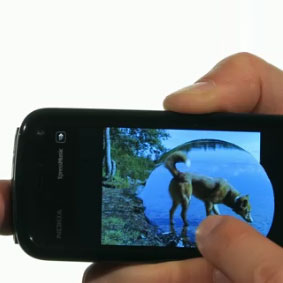
Amazing gallery interface. Just like apple iphone. You can zoom picture with a click of your finger, change picture like water flow, rotate vertical to horizontal view with your eccelerometer sensor and many more.


                                                     Download now


Automatic Message Hider s60v5 app

Sunday, September 9, 2012

Advanced Phone Lock v1.02.2x S60v5 SymbianOS9.4

Advanced Phone Lock is an integrated locker service which allows you to lock any application from your smartphone. Nobody can use the locked applications without to know the password. You can lock any important application which stores sensitive data for you like credit card numbers, financial data, passwords, images, sms messages or anything else important for you. The service is also able to lock the phone and keypad. When the phone is locked, you or somebody else have to enter the password in order to unlock and continue to use the phone as normally. The same password is used for any lock/unlock action in order to have an easy use.
* Applications Lock key features.
- you can select and lock as many as applications you wish.
- allows you to set the lock mode. If set on ”When shown”, the password to unlock the application is asked every time when you or somebody else try to use the locked application. If set on ”Use autolock”, the password to unlock the application is asked only the first time. The password will be asked later only after the inactivity time you have set in the settings.
- automatically closes/exits the application if you cancel to enter the password in the lock form. This saves memory for the normal phone usage.
- able to disable the lock if charging. This helps when you drive the car and you have plugged the phone in the car’’s charger. If you plug-in the charger and enter the password, the applications will no more be locked as long as the charger is plugged-in. You can use the phone as normally and you will not be disturbed by the lock service while you are driving. When you plug-out the charger, the applications will automatically be locked again.
- all applications lock settings can be changed (enabled/disabled)
* Phone Lock key features.

- able to lock after the phone is powered-on (lock at boot).
- you can set an autolock period after which the phone is automatically locked (1-30 minutes).
- the phone can be locked by the long press of a key (hotkey). You can define the hotkey long press period between 1 to 10 seconds and choose the hotkey from a list.
- locks the phone if the case (slider or cover) is closed or opened.
- able to lock the keypad also when the phone is locked.
- disable the phone lock if charging.
This works similar like for the applications lock described above.
- all phone lock settings can be changed (enabled/disabled).
* IMPORTANT:
- When started the first time, you need to enter the default password which is 1234. You can change the password from the main menu.
- Using Advanced Phone Lock, it is strongly recommended you lock the ”Installer” and the ”Applications Manager” built-in applications in order to prevent unauthorised persons to uninstall any application (including Advanced Phone Lock).
Download now

yahoo messenger for 5800 and s60v5 App

YMTiny is a free J2ME Yahoo! Messenger which connect directly to the Yahoo’s server. Just connect with your Yahoo! ID, no other registration needed. It should work on all CLDC1.0 and MIDP2.0 devices.
Features
  • Settable message alerts: sound (midi), vibrate, flash backlight, open IM window
  • Bitmap fonts for consistent GUI
  • “Smart Ping” maintains connection and minimizes bandwidth usage
  • Receives offline messages, new mail and typing notifications
  • Set status and custom status
  • View a friend’s status, show and hide offline friens
  • Send and receive BUZZ!!!
  • Run in background and auto-restore
  • Window and scroll animations
  • stylus support
  • 54+2 Emoticons!
  • Data counter
Limitations
  • Does not support HTTP/WAP connection yet
  • Minimize function only works on some devices
Next features
  • Sends typing notifications (settable)
  • More sounds
  • Message archive
  • Conference
  • Skins

Download now

Saturday, September 8, 2012

Alon mp3 player v1.00 s60v5 App

Download now


Description : Support info: s60v3 s60v5 symbianos9.x signed retail by alirezaoverview:alon mp3 player is an audio player which supports mp3, ogg, aac mp4, amr and wav formats, 3 band parametric equalizer, m3u playlists and hot buttons.audio player: high quality stereo playback. pause and resume playback during after incoming calls. you can keep listening to music. you may choose any folder and all subfolders from any location on your phone for playback. organize your own music library by creating the folders with your favourite tracks. choose the way of playing the list: play track, loop track, loop playlist, randomize. an opportunity of interrupt not interrupt playback by incoming messages.m3u playlists: support m3u playlists. you may both use winamp playlists on your phone and use playlists created at your phone at winamp.hot buttons: you may sign all actions such as play, stop, pause, forward rewind, back rewind, on off equalizers, switching between playlist and equalizer to hardware buttons.internet radio: easy to use interface. internet radio is free.equalizer: with 3 band parametric equalizer you may easily adjust playback as you like. player saves your presettings for equalizer. you may adjust playback as you want and don t use equalizer at the next time.

Careme findme v2.00.1 s60v5 App

Download here

Description : Worried about losing your phone?if your phone is stolen & a new sim isinserted into your phone, findme sends sms silently from thief s phone to a buddy phone number.track thief on google map.get features like remote lock,auto lock,loud siren & uninstall prevention by thief.upon detecting new sim inside phone, findme plays loud siren,which helps you to find culprit in crowded place.operate findme remotely through sms commandsbecause the concept of the application, findme is hidden insideyour phone. hence after successful installation you can t find applicationicon by navigating to the area on the phone where new applications are installed. even the application does not appears inside task manager when running. to start the application, you should dial 6 digit password. default password is set as 000000 at the time of installation. if you are replacing previous installation, old password will be maintained. it is strongly recommended to reset your 6 digit password (if it is default)afterwards, so that unauthorized user can t access the application.upon forgetting 6 digit password, you can get it on your buddy s number by sending findme 013 sms to handset in which findme is running.the application have auto start functionality. but we don t have an option which allows the user to enable disable auto start functionality. reason for such kind of behaviour is as described below.since findme is a hidden application and also does not appears inside task manager whenrunning. if the setting for auto start behaviour is disabled, upon restarting the device there won t be any way by which user will be able to start the application. to avoid thesituation we haven t given any option to enable disable auto start functionality, and by defult auto start behaviour is enabled.we have "protect uninstall " binary setting field which allows the user toenable disable uninstallation of the application. if it is enabled and someone tries to uninstall the application from phone, it resticts user with a popup message to avoidunauthorized uninstallation of the application. in order to uninstall the application "protect uninstall " setting must be disabled. since findme also works as anti theft, we have implemented conditional uninstall feature, otherwise if someone steals phone, he can easily uninstall the application from phone and it won t be possible to find the phone.application supports only portrait screen mode and does not supportslandscape screen mode.

Friday, September 7, 2012

QIP Mobile v30.01 s60v5 app


Multi-protocol instant messaging client for S60v5 devices with support ICQ, GoogleTalk, XMPP (Jabber), Live Journal and others.


Adobe Reader v2.05 s60v5 app

Adobe Reader LE 2.5 is a PDF (Adobe Portable Document Format) viewer optimized for S60 5th Edition mobile devices such as Nokia 5800 XpressMusic, Nokia 97 and others. Enjoy enhanced PDF viewing of documents and attachments with reflow view, zoom view, page rotation, text search and many others best features. More Powerful Than Ever! Now supports English, French, Italian, German, and Spanish.


Download now

Nokia Multiscanner V.1.18 s60v5 app

With Nokia Multiscanner you�re able to use your phone like a reader.

The applicaton is using Optical Character Recognition (OCR) technology to identify letters

Application is also working very successfully in poor light.

Don�t forget� In the near future, Nokia Multiscanner will become the translator in your pocket

Here is an example of Converted texts

Language libraries are stored in the device and can be updated over the air (OTA)

directly to the mobile.

The language library for an alphabet language, for example English, French, or Greek, requires approximately 600 kilobytes; and for a character-based language, for example Chinese or Japanese, 3 megabytes is required.

After installing Multiscanner: In send section you will see �To Text Recognizer� section. You can also scan pictures inside your memory

 Download now

MobileEffort Message In Time v1.0.12 S60V5 APP

The program is designed for planning of time when your SMS should be sent. Via the internal interface you're able to create and manage short messages in an ordinary way. After the message creation you set date and time when the system has to wake up and send it. This approach can be useful when you're going to deliver birthday greetings not today but in several days. Or you intend to remind some of your colleagues to do important things tomorrow morning. In any case the application will silently assist you and won't bother when you have little time.

Download now

iDesk v1.0 s60v5 app

is pack includes the following:

-GDesk 0.33d for 5800 (fully compatible portrait mode gdesk)
-Plugins for GDesk
-Iphone 5th Edition Dsma Theme
-iDesk-5800.gdd theme and Five wallpapers that are suited for it.

FIRST OF ALL, to install the unsigned sis file of gdesk and its plugins,
you need to have either a certificate from OPDA, or your 5800 should be hacked.
Otherwise, you will get the Certificate ERROR.
To get a certificate, search google for OPDA CERT.

Install Gdesk and all included plugins.

Install the provided iPhone 5th Dsma theme and select it from your phone default themes.

Copy the GDD file to your memory card too.
Open GDesk, touch anywhere, choose DESIGN>> LOAD DESIGN and select the iDesk-5800.gdd from your memorycard.

To change wallpaper, Click anywhere, DESIGN>> SET DESKTOP>> SET IMAGE and choose the wallpaper.


DOWNLOAD HERE

Monday, September 3, 2012

Facebook v1.00 S60V5 APP

Sunday, September 2, 2012

Device Info Software For Nokia S60v5

Phone Torch App For S60v5 And Symbian^3

Windows Live App For S60v5 And Symbian^3

Time Screensaver App For S60v5 And Symbian^3

Twitter Client App For S60v5 And Symbian^3 Mobiles

Quick Search For S60v5 And Symbian^3 Mobiles

Q Search” (Q for Quick), and it’s simply a search-page launcher – but one that’s optimized for the least number of clicks from the home page of the phone.
It can be installed as a “Home Screen Widget” if you have an N97, or launched from the quick-bar or icon like any other app. It immediately prompts you (using an ugly Javascript prompt dialog, sadly) for your search query, then you enter some text hit OK and BAM, you’re connecting to the web for your results.
added in some “shortcuts” which let you search Google (g), Wikipedia (w), YouTube (v), Google Images (i), Twitter (t) and Definr dictionary (d) by entering the letter with a space before the search text. And when you’re done, you close the web page, the widget automatically closes itself as well.

 DOWNLOAD NOW

Saturday, September 1, 2012

FLV Player v 1.01 s60v5 app

Ringtone Maker S60v5 App

Twitter Delicious Facebook Digg Stumbleupon Favorites More

 
Powered by Blogger